

The d20Tek.DiceNotation library has been able to evaluate dice expressions such as 4d6k3+2 for a long time. It parses the notation, rolls the dice, applies the keep and drop rules, and hands back a DiceResult. That has the basics that any application needs to handle the randomness of dice rolls. But it doesn’t bring it all together in an experience for the player (that had been left to the developers using the d20Tek.DiceNotation library to implement).
But players want to see the dice roll. They want to watch the dice tumble across a tray, bounce off the walls, and come to rest.
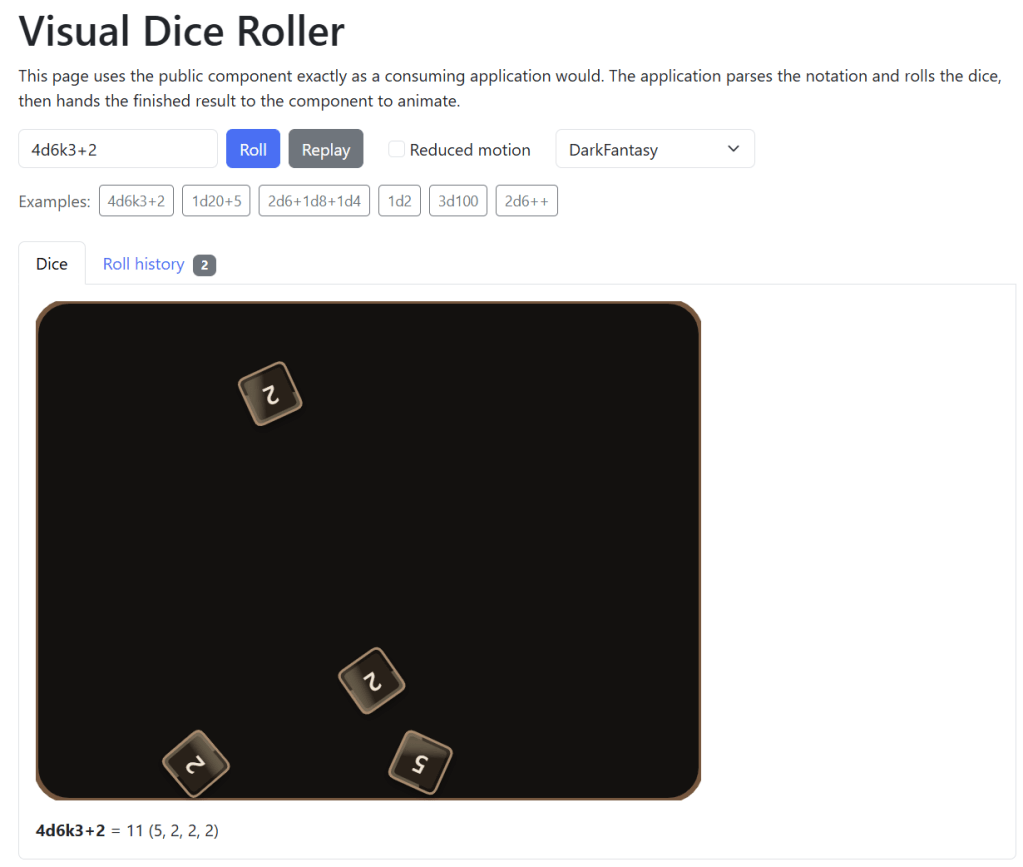
d20Tek.DiceNotation.Blazor is the component library that closes that gap. It takes a completed DiceResult and animates it as physical dice tumbling across a tray, drawn on an HTML canvas, driven by a real two-dimensional rigid-body simulation. This component is solely focused on 2D dice animation. It doesn’t go into the 3D world of WebGL or three.js – though that may be additions in the future.
This article walks through the design: the one rule that shaped every decision, the layers the library is built from, how physics and browser frame timing were reconciled, and how animation code that runs sixty times a second was made unit testable.
The rule that shaped everything
The single most important design decision in this library is that the animation never decides anything.
A die’s value is determined by d20Tek.DiceNotation before the simulation starts. The physics decides where a die comes to rest and how it tumbles on the way there. It does not decide what the die shows. The face is painted onto the die for the entire roll, and the die has carried that value since before the first frame was drawn.
The alternative design, where a physics engine determines which face lands up, is tempting because it sounds more authentic. It is a bad idea for an application that has to be trustworthy. A roll must be auditable, reproducible, and in agreement with whatever the application already logged or sent to a server. A simulation that produces values would make the outcome depend on floating-point behavior, frame timing, and the specific browser the player happens to use. Worse, a dropped frame or an interop failure would become a correctness bug rather than a cosmetic one.
Separating the two concerns has a pleasant consequence: failure modes become boring. If the canvas cannot be created, if the JavaScript module fails to import, if the Blazor circuit disconnects mid-roll, the application still has a complete and valid result. The component reports the problem through OnRollFailed and the application keeps displaying the numbers it already had.
This principle even reaches down into which random number generator is used where. The simulation takes its own Random instance, and the documentation explains why it must not be the one the dice library uses:
/// <param name="random">
/// The random source used for animation motion only. It must be independent of the
/// source that generates die results, because changing it must never change a result.
/// </param>
public AetherDiceSimulation(DiceSimulationSettings? settings = null, Random? random = null)
That matters for the reproducible-rolling scenario the core library supports. If an application seeds the dice library to replay a session, the replay must produce the same numbers. If the animation drew from that same seeded source, simply rendering a roll would disrupt the sequence and the next roll would differ. Keeping the sources separate makes the animation genuinely free of consequence.
What using it looks like
Before the architecture, here is the whole developer-facing surface. Registration is one call, which also registers the core dice library so a consumer does not have to remember to do both:
builder.Services.AddDiceNotationBlazor();
And the component takes a result:
@inject IDice Dice

<VisualDiceRoller Result="_result" OnRollCompleted="OnCompleted" />

<button @onclick="Roll">Roll</button>

@code {
	private DiceResult? _result;

	private void Roll() => _result = Dice.Roll("4d6k3+2");

	private void OnCompleted(DiceRollSummary summary) => Console.WriteLine(summary.Total);
}
The random roll happens in the Dice.Roll call. The component receives the finished result and plays it back. That ordering is visible right there in the usage, and it is deliberate; the API should make the design obvious rather than hide it.
The layered design
The library is five layers, each with one job and a narrow boundary to the next.
VisualDiceRoller– the Blazor component. Owns parameters, lifecycle, accessibility, and the callbacks the application sees.DiceAnimationLoop– the conductor. Connects the simulation to the renderer through one frame scheduler and owns per-animation state.IDiceSimulation/AetherDiceSimulation– the physics. Advances bodies in a tray and reports when the scene has settled.CanvasRenderer/RenderScene– the interop boundary. Turns a scene snapshot into a single batched JavaScript call.dice-roller.js– the drawing code. Owns the canvas context, device pixel ratio, and the browser frame scheduler.
Data flows down and events flow up. The component never talks to JavaScript, the simulation never knows a canvas exists, and the renderer never knows what physics engine produced a snapshot.
Layer 1: the component
VisualDiceRoller is intentionally thin. Its most interesting logic is deciding when a new animation should start, and the answer uses reference equality on purpose (so whenever the user supplies a new result instance, it will animate):
protected override async Task OnParametersSetAsync()
{
	if (_disposed || !_initialized || Disabled || Result is null) return;

	// Reference equality is deliberate. Each roll produces a new result instance, and
	// re-animating an equal result is an explicit ReplayAsync call.
	if (ReferenceEquals(Result, _animatedResult)) return;

	await StartAnimationAsync(Result, CancellationToken.None);
}
Value equality would have been the obvious choice and it would have been wrong. Roll 2d6 twice and get a seven both times, and a value-equality check would silently refuse to animate the second roll. Reference equality means every new roll animates, and re-playing the same result is an explicit decision the application makes by calling ReplayAsync.
There is also a quietly important edge case. A result can be assigned before the canvas exists, so the first render has to pick it up:
protected override async Task OnAfterRenderAsync(bool firstRender)
{
	if (!firstRender || _disposed) return;

	try
	{
		var options = ResolvedOptions;
		options.Validate();

		var (renderer, loop) = LoopFactory.Create(options.SimulationSettings);
		_renderer = renderer;
		_loop = loop;
		_loop.AnimationCompleted += OnAnimationCompletedAsync;
		_loop.AnimationFailed += OnAnimationFailedAsync;

		await _renderer.InitializeAsync(_canvas);
		_initialized = true;

		// A result supplied before the canvas existed still has to animate once.
		if (Result is not null && !Disabled)
		{
			await StartAnimationAsync(Result, CancellationToken.None);
		}
	}
	catch (Exception ex)
	{
		await RaiseFailureAsync(ex);
	}
}
Note the shape of the error handling. Everything in component initialization is wrapped, and the catch does not rethrow. An unusable canvas is a visual problem, and the component’s contract is that visual problems are reported, not thrown.
Layer 2: the animation loop
DiceAnimationLoop is where the physics and the browser meet. Its own documentation sums up the division of labor better than prose can:
/// <remarks>
/// The browser owns frame timing, this type owns the physics, and the renderer owns
/// drawing. Each displayed frame advances the simulation by the elapsed time and sends
/// exactly one batched snapshot to the renderer, so interop traffic stays proportional
/// to displayed frames rather than to dice or physics substeps.
/// </remarks>
internal sealed class DiceAnimationLoop : IAsyncDisposable
The phrase worth dwelling on is “proportional to displayed frames rather than to dice or physics substeps.” A naive implementation makes one interop call per die per frame. With twelve dice at sixty frames a second, that is 720 marshaling round trips every second, and in Blazor Server every one of those crosses a SignalR connection. Batching the entire scene into one payload per frame reduces that to sixty, and it stays at sixty whether the roll has one die or fifty.
The frame callback itself is small, which is the point:
[JSInvokable]
public async Task OnFrameAsync(double elapsedSeconds)
{
	if (_disposed || !_isRunning) return;
	try
	{
		_frameTimer.Restart();

		// The simulation bounds its own catch-up work, so a large delta cannot
		// produce unbounded stepping here.
		_simulation.Step((float)elapsedSeconds);
		await RenderCurrentAsync(CancellationToken.None);

		_frameTimer.Stop();
		RecordFrame(_frameTimer.Elapsed.TotalMilliseconds);

		if (_simulation.IsSettled) await CompleteAsync();
	}
	catch (Exception ex)
	{
		await FailAsync(ex);
	}
}
Step, render, measure, check for completion. The timing instrumentation is not just for decoration; the loop exposes LastFrameMilliseconds, WorstFrameMilliseconds, and AverageFrameMilliseconds so that interop cost can be measured on a real device rather than estimated. Performance claims about interop batching are easy to make and much better to verify.
Layer 3: the physics
Dice are simulated with Aether.Physics2D, behind an IDiceSimulation interface. The tray is four static walls, each die is a dynamic body, and the scene is considered finished when every body has been at rest for a configured hold time:
public bool IsSettled =>
	_dice.Count > 0 &&
	(_restingSeconds >= _settings.SettleHoldSeconds || _elapsedSeconds >= _settings.MaxDurationSeconds);
Two details in that one expression are worth pulling out.
The hold time exists because a single frame of low velocity is not the same as being at rest. A die bouncing off a wall passes through zero velocity at the top of its arc. Requiring every die to stay below the thresholds for SettleHoldSeconds (0.2 seconds by default) filters out those instants.
The duration cap exists because physics engines can be surprising. An arrangement of fifty dice in a small tray can jitter for a long time. Rather than leaving the component stuck in a rolling state too long, the simulation declares the roll over at MaxDurationSeconds. Because results were fixed before the roll began, a timed-out roll reports exactly the same values a settled roll would have. The worst case is an animation that ends slightly abruptly, which is a far better failure than a tray that never stops.
The rest thresholds themselves are tuned to perception rather than to mathematics:
/// <summary>
/// Gets the linear velocity at or below which a die is considered at rest. This is set
/// to the speed at which movement stops being perceptible rather than to a near-zero
/// value, because damping decays exponentially and the final crawl toward true zero
/// takes seconds of frames that look identical.
/// </summary>
public float LinearSleepThreshold { get; init; } = 0.4f;
Exponential damping never actually reaches zero. Waiting for it produces several seconds of frames that are mathematically distinct and visually identical, during which the player is just waiting. Stopping when motion stops being visible is the correct engineering answer even if it might be the less rigorous one.
Layer 4 and 5: the interop boundary
CanvasRenderer wraps the JavaScript module and owns exactly one canvas element. It imports the module as an IJSObjectReference, so the JavaScript is scoped to the component rather than leaking onto window:
private const string ModulePath = "./_content/d20Tek.DiceNotation.Blazor/js/dice-roller.js";

public async ValueTask InitializeAsync(ElementReference canvas, CancellationToken cancellationToken = default)
{
	ObjectDisposedException.ThrowIf(_disposed, this);

	if (IsInitialized) return;

	_module ??= await _jsRuntime.InvokeAsync<IJSObjectReference>("import", cancellationToken, ModulePath);
	_handle = await _module.InvokeAsync<int>("initialize", cancellationToken, canvas);
}
The integer handle is how several rollers coexist on one page. The JavaScript module keeps a table of canvas contexts keyed by handle, and every subsequent call carries the handle. Each component gets its own entry, its own frame scheduler, and its own teardown.
Rendering is a single call carrying a fully resolved payload:
var payload = RenderScene.FromSnapshot(scene, traySize, theme, visualSettings);
await _module!.InvokeVoidAsync("render", cancellationToken, _handle, payload);
RenderScene.FromSnapshot is where a deliberate architectural choice lives. The JavaScript receives drawing instructions, not physics state. It is told which polygon to trace, what corner radius to use, which colors to fill with, how much shadow to draw, and which face value to paint. It is not told velocities or energy and asked to work it out. All of that logic lives in C#, in DieVisualCalculator, where it is typed, documented, and testable. The JavaScript stays close to pure drawing code, which is the part of the stack that is hardest to test and therefore the part that should contain the fewest decisions.
Reconciling fixed-step physics with browser frames
This is the part of the project that took the most iteration, and it is the part most likely to be useful to someone building some similiar animations.
Physics engines want a fixed timestep. Determinism, stability, and sane collision response all depend on stepping the world by the same small increment every time. Browsers want to hand you a variable delta, because requestAnimationFrame fires when the display is ready and the gap between frames depends on refresh rate, system load, and whether the user switched tabs.
The reconciliation is an accumulator:
public int Step(float elapsedSeconds)
{
	ObjectDisposedException.ThrowIf(_disposed, this);

	if (_world is null || _dice.Count == 0 || IsSettled)
	{
		return 0;
	}

	// Ignore negative or non-finite deltas, which a browser frame callback can produce.
	if (float.IsFinite(elapsedSeconds) && elapsedSeconds > 0f)
	{
		_accumulator += elapsedSeconds;
	}

	var step = _settings.FixedStep;
	var steps = 0;

	while (_accumulator >= step && steps < _settings.MaxCatchUpSteps && !IsSettled)
	{
		_world.Step(step);
		_accumulator -= step;
		_elapsedSeconds += step;
		steps++;

		_restingSeconds = AllDiceAtRest() ? _restingSeconds + step : 0f;
	}

	// Drop any remaining backlog so a long pause cannot accumulate into future frames.
	if (_accumulator >= step)
	{
		_accumulator = 0f;
	}

	// ...
}
Each piece of that is defending against a real failure.
Non-finite and negative deltas. A frame callback can produce a NaN or a negative value when timestamps misbehave across a tab resume or a clock adjustment. Feeding NaN into a physics engine corrupts the world permanently; every position becomes NaN and the dice disappear. Validating at the boundary is cheap and the alternative is unrecoverable.
Bounded catch-up. MaxCatchUpSteps defaults to five. Without a bound, a one-second pause would request sixty physics steps inside a single frame, which blows the frame budget and makes the next delta larger, requiring even more steps.
Dropping the backlog. Clamping the number of steps leaves time in the accumulator. If that debt persists, every subsequent frame runs at the cap, and the animation plays in slow motion until the debt clears. Discarding the remainder means the simulation loses a slice of time once, which nobody perceives, instead of running wrong for a second, which people will notice.
There is a second line of defense in JavaScript, before the delta ever reaches .NET. StartLoopAsync passes a clamp down to the browser:
/// <param name="maxFrameSeconds">
/// The largest elapsed time reported to .NET for a single frame. This bounds the
/// catch-up work produced by a long pause such as a backgrounded tab.
/// </param>
public async ValueTask StartLoopAsync(
	object callback,
	float maxFrameSeconds,
	CancellationToken cancellationToken = default)
The corresponding default documents the exact scenario:
/// <summary>
/// Gets the largest elapsed time, in seconds, reported for a single animation frame.
/// The browser stops scheduling frames for a backgrounded tab, so the first frame
/// after resuming is clamped to this value instead of replaying the whole pause.
/// </summary>
public float MaxFrameSeconds { get; init; } = 0.1f;
A user who starts a roll, switches tabs for ten minutes, and comes back would otherwise deliver a
600-second delta. Clamping at the source means .NET never sees it.
Clamping at both boundaries is not unnecessary redundancy. The JavaScript clamp handles the
expected case efficiently. The C# guards handle the unexpected case, and they are also what makes the
simulation testable in isolation, because a unit test can call Step with erroneous values directly.
Painting the right face on a tumbling die
Given that the value is fixed in advance, what should a die show while it is still spinning? Showing
the final value for the whole roll looks static and gives the outcome away immediately. Showing
random faces every frame flickers.
DieVisualCalculator resolves this with an energy-driven churn that locks as a die slows:
/// <summary>
/// Determines the face to draw. A fast-moving die churns through plausible faces for
/// its own side count; as it slows it locks to the fixed, precomputed result.
/// </summary>
internal int ResolveShownValue(DieState die, float energy, float elapsedSeconds)
{
	if (energy <= _settings.FaceLockEnergy)
	{
		return die.Value;
	}

	return ChurnFace(die, energy, elapsedSeconds);
}
The churn is derived from the die’s own rotation rather than from a random source:
internal static int ChurnFace(DieState die, float energy, float elapsedSeconds)
{
	var faces = Math.Max(1, die.Sides);
	if (faces == 1)
	{
		return die.MinValue;
	}

	var spin = MathF.Abs(die.Rotation) * (2f + (energy * 8f));
	if (!float.IsFinite(spin))
	{
		return die.Value;
	}

	return ((int)MathF.Floor(spin) % faces) + die.MinValue;
}
This is a pure function of the die’s physical state, which means it needs no per-frame storage, it
cannot drift out of step with the simulation, and a unit test can verify it exhaustively by feeding
in rotations. The + die.MinValue is there for fudge dice, which run from minus one to plus one
rather than from one, so churning has to respect each die’s actual face range rather than assuming
one through N.
The guarantee holds at both ends. Below the lock energy the die shows its true value, and a settled
scene forces energy to zero regardless of what the physics engine reports:
// A settled scene always draws true values at rest, regardless of reported energy.
var energy = useMotionEffects && !isSettled ? Clamp01(die.Energy) : 0f;
The same energy value drives the other motion cues, so they all decay together: implied lift, shadow
blur and offset, and a directional motion smear trailing the die’s velocity. The die appears to rise,
cast a softer shadow, and blur along its path while it is moving fast, and all three effects fade in
lockstep as it settles. One input, several coordinated outputs, no state.
Shapes that collide the way they look
A d20 drawn as a hexagon that collides as a square would feel subtly wrong without the player being
able to say why. DieGeometry prevents that by being the only source of shape in the library:
/// <remarks>
/// This is the single source of truth for die shape. The renderer traces the outline
/// returned here, and the physics simulation builds its bodies from the same outline, so
/// a die can never collide as one shape while being drawn as another.
/// </remarks>
internal static class DieGeometry
The outlines are the recognizable silhouette each polyhedron presents: a d2 is a coin, a d4 a
triangle, a d6 a square, a d8 a diamond, a d10 and d100 kites, a d12 a pentagon, a d20 a hexagon.
The non-obvious part is normalization. Outlines are normalized to approximately equal area, not
their bounding box, and the reason is purely perceptual:
/// Outlines are normalized to a unit bounding size and to approximately equal area. Equal
/// area matters more than equal width here: a hexagon inscribed in the same square as a
/// triangle looks far bigger, so without this correction a d20 would dwarf a d4 in the
/// same tray.
A triangle inscribed in a unit square covers half the area a hexagon does. Normalizing by width
produces a tray where the d20 looks like a boulder next to the d4. Normalizing by area produces dice
that are members of the same set, which is what a physical dice set actually looks like.
Corner rounding gets the same per-shape treatment, including a trick for the coin:
/// Shapes with sharp corners need a smaller radius, because rounding a narrow corner
/// as heavily as a square corner would visibly erode the silhouette. A coin is the
/// opposite case: its radius deliberately exceeds what any corner can consume, so the
/// renderer's per-corner clamp rounds every corner as far as it will go and the
/// octagon reads as a circle.
An octagon with maximally rounded corners is a circle, so the d2 coin needs no special case in the
renderer at all. It is the same polygon-tracing code with a radius the clamp saturates.
Outlines never change, so they are built once and cached behind a lock:
private static readonly Dictionary<int, IReadOnlyList<Vector2>> _cache = [];
private static readonly Lock _cacheLock = new();
Mapping a DiceResult onto dice to animate
VisualDieFactory is the bridge between the notation library’s result model and the visual model.
The job sounds mechanical and contains a few genuinely interesting problems.
Term types arrive as strings like DiceTerm.d20, so the face count has to be parsed back out, and
fudge dice break the usual assumption that a die runs from one to N:
private static (int Sides, int MinValue) ResolveFaces(string type)
{
	if (type.StartsWith(FudgeTermPrefix, StringComparison.Ordinal)) return (FudgeSides, FudgeMinValue);

	var separator = type.LastIndexOf(".d", StringComparison.Ordinal);
	if (separator >= 0 &&
		int.TryParse(
			type[(separator + 2)..],
			NumberStyles.None,
			CultureInfo.InvariantCulture,
			out var sides) &&
		sides > 0)
	{
		return (sides, 1);
	}

	// The input is library-produced, so an unrecognized shape is treated as an
	// ordinary die rather than failing the whole animation.
	return (DefaultSides, 1);
}
The fallback is a judgment call worth naming. The input comes from a trusted source, the core library
itself, so an unrecognized term type almost certainly means the core library grew a new feature the
component has not caught up with. Falling back to a d6 means a newer core library degrades to a
slightly wrong-looking die rather than to a thrown exception on a user’s screen. The numbers stay
correct either way, because the value comes straight off the term.
The modifier calculation is the other case where the result model required a workaround:
/// <summary>
/// Determines the non-dice portion of a roll by subtracting what the dice contributed
/// from the library's total. The notation parser folds constants directly into the
/// total rather than recording them as terms, so the modifier cannot be read from
/// <see cref="DiceResult.Results"/> and must be derived instead.
/// </summary>
public static int CalculateModifier(DiceResult result)
The parser folds constants into the total, so +2 leaves no term to read. Deriving the modifier by
subtraction keeps the displayed breakdown consistent with the authoritative total, which is the
property that actually matters. Documenting why the code subtracts instead of reading is what stops
a future maintainer from “fixing” it.
One more edge case deserves mention, because it is the kind of thing that ships as a hang. An
expression like 5 is valid notation, has a total, and contains no dice:
if (_summary.Dice.Count == 0)
{
	// A modifier-only expression has nothing to animate, but it still has a
	// total, so it completes immediately rather than appearing to hang.
	await RaiseCompletedAsync();
	return;
}
Without that branch, OnRollCompleted never fires and an application waiting on it waits forever.
Configuration that is immutable where it counts
Configuration is grouped into DiceRollerOptions, which composes DiceTraySize, DiceTheme,DiceVisualSettings, and DiceSimulationSettings. Grouping keeps the component’s parameter list
small and lets the options evolve without breaking consumers.
A theme shared between components
cannot be mutated by one of them, and with expressions make targeted changes safe:
public DiceTheme ResolveTheme() =>
	ReducedMotion ? Theme with { UseMotionEffects = false } : Theme;
Reduced motion is an explicit option rather than an automatic media-query check, and the reasoning is
documented in place:
/// <remarks>
/// This is an explicit option rather than an automatic media-query check, because an
/// application usually already knows its own accessibility preferences and can apply
/// them consistently across its UI.
/// </remarks>
public bool ReducedMotion { get; init; }
Applications that honor prefers-reduced-motion usually have a single place where that preference is
resolved, often combined with a user setting. A component that independently queried the media query
could disagree with the rest of the application. Accepting that flag as input keeps the component
consistent with its host.
Because records are immutable, registration uses a builder pattern that produces one:
public sealed class DiceRollerOptionsBuilder
{
	public DiceTraySize TraySize { get; set; } = DiceTraySize.Default;
	public DiceTheme Theme { get; set; } = DiceTheme.Default;
	public DiceVisualSettings VisualSettings { get; set; } = DiceVisualSettings.Default;
	public DiceSimulationSettings SimulationSettings { get; set; } = new();
	public bool ReducedMotion { get; set; }

	public DiceRollerOptions Build()
	{
		var options = new DiceRollerOptions { /* ... */ };

		// Failing during registration is far easier to diagnose than failing later inside
		// a component's first render.
		options.Validate();

		return options;
	}
}
Validating during Build is a deliberate fail-fast choice. An invalid FixedStep discovered at
startup produces a clear exception with a stack trace pointing at Program.cs. The same value
discovered during a component’s first render produces a mysterious visual failure.
Validation itself is thorough and specifically rejects non-finite values, because those are what
cause failure in the physics engine:
private static void EnsurePositive(float value, string name)
{
	if (!float.IsFinite(value) || value <= 0f)
	{
		throw new ArgumentOutOfRangeException(name, value, $"{name} must be a finite, positive value.");
	}
}
Configuration resolves in three tiers, from most specific to least:
// Options supplied on the component win, then the application-wide defaults supplied
// during registration, then the library defaults.
private DiceRollerOptions ResolvedOptions => Options ?? DefaultOptions ?? DiceRollerOptions.Default;
Set a house theme once at registration, override it on the one roller that needs to look different,
and get sensible behavior with no configuration at all.
Registration itself is one call that also registers the core library:
public static IServiceCollection AddDiceNotationBlazor(
	this IServiceCollection services,
	Action<DiceRollerOptionsBuilder>? configureRoller = null,
	Action<DiceNotationOptionsBuilder>? configureDice = null)
{
	ArgumentNullException.ThrowIfNull(services);

	services.AddDiceNotation(configureDice);

	var builder = new DiceRollerOptionsBuilder();
	configureRoller?.Invoke(builder);

	var options = builder.Build();
	services.AddSingleton(options);

	// The factory only depends on IJSRuntime, which is scoped in Blazor Server, so the
	// factory itself is scoped. Each component still receives its own loop instance.
	services.AddScoped<IDiceAnimationLoopFactory, DiceAnimationLoopFactory>();

	return services;
}
The service lifetimes carry an important constraint. The options record is immutable and shared, so
it is a singleton. The factory depends on IJSRuntime, which is scoped per circuit in Blazor Server,
so registering it as a singleton would capture one user’s JavaScript runtime and serve it to every
other user. Simulations and loops hold mutable per-animation state, so they are created per component
by the factory rather than registered at all. Lifetime bugs in a library are particularly unkind,
because they usually surface only under concurrent load in production.
Disposal, when the browser is already gone
Blazor component disposal races with things the component cannot control: page navigation, circuit
teardown, a closed browser tab. Any of those can make a JavaScript call fail. Letting that failure
escape DisposeAsync produces unhandled exceptions during normal teardown.
The renderer handles its end:
public async ValueTask DisposeAsync()
{
	if (_disposed) return;

	_disposed = true;

	// Disposal commonly races with circuit teardown or page navigation, so the
	// interop exceptions that signal an unreachable browser are expected here.
	try
	{
		if (_module is not null)
		{
			if (_handle != 0)
			{
				// Stop scheduling frames before releasing the module so a queued
				// frame callback cannot run against disposed .NET state.
				await _module.InvokeVoidAsync("stopLoop", _handle);
				await _module.InvokeVoidAsync("dispose", _handle);
			}
			// ...
		}
	}
	// ...
}
The ordering comment is the critical part. Stopping the scheduler before releasing the module means
no queued frame can fire against a disposed DotNetObjectReference.
The loop’s disposal catches a specific exception set rather than everything:
try
{
	await _renderer.DisposeAsync();
}
catch (Exception ex) when (ex is JSException or
								 JSDisconnectedException or
								 ObjectDisposedException or
								 OperationCanceledException)
{
}

_selfReference?.Dispose();
_selfReference = null;
_simulation.Dispose();
A blanket catch (Exception) during disposal hides real bugs forever. Naming the four exception
types that genuinely mean “the browser is unreachable” swallows the expected noise and lets anything
unexpected surface.
Ownership is single and documented: the component disposes the loop, the loop disposes the renderer
and simulation it was given, and the renderer disposes the module and handle. Every object has
exactly one owner, so nothing is disposed twice and nothing is leaked.
StopAsync follows the same philosophy:
// Stopping a disposed loop is already the desired end state, so it is a no-op
// rather than an error. This keeps teardown races from throwing.
if (_disposed || !_isRunning) return;
Rendering without re-rendering
A sixty-frames-per-second animation inside a Blazor component raises an obvious concern: Blazor’s
render tree is not designed to run sixty times a second.
It does not have to. The canvas is drawn by JavaScript, and the component re-renders exactly once per
animation:
private async Task RaiseCompletedAsync()
{
	// Re-render once when the animation ends so the accessible label reflects the
	// settled results. This never happens per frame.
	StateHasChanged();

	if (OnRollCompleted.HasDelegate)
	{
		await OnRollCompleted.InvokeAsync(_summary);
	}
}
This is possible because the canvas lives outside Blazor’s diffing model. Blazor creates the element once, the renderer takes an ElementReference to it, and from then on drawing is handled by JavaScript. Blazor has nothing to diff because the markup never changes.
Accessibility on a canvas
A canvas is opaque to assistive technology. It is a rectangle of pixels with no semantic content, so a screen reader user gets nothing from the animation at all. The component generates a label from the settled result instead:
private string AccessibleLabel
{
	get
	{
		if (AriaLabel is not null) return AriaLabel;
		if (_summary.Dice.Count == 0) return "Dice tray";

		var values = string.Join(", ", _summary.Dice.Select(d => d.Value));
		return $"Dice tray showing {_summary.Dice.Count} dice with values {values}, totaling {_summary.Total}.";
	}
}
That single StateHasChanged at the end of the animation is what updates this label in the DOM. A screen reader user hears “Dice tray showing 4 dice with values 5, 3, 6, 2, totaling 16” – the actual outcome, in words, without any dependence on the visuals.
The layout side is handled without JavaScript measurement by deriving a CSS aspect ratio from the configured tray:
private string AspectRatio
{
	get
	{
		var tray = ResolvedOptions.TraySize;
		return $"{tray.Width.ToString(System.Globalization.CultureInfo.InvariantCulture)} / " +
			   $"{tray.Height.ToString(System.Globalization.CultureInfo.InvariantCulture)}";
	}
}
CultureInfo.InvariantCulture is not pedantry. A machine with a comma decimal separator would emit aspect-ratio: 8,0 / 6,0, which CSS silently ignores, producing a broken layout only for users in certain locales. Culture-sensitive formatting in machine-readable output is one of the most reliably painful bugs in .NET, and the fix is to always be explicit.
Reduced motion closes the loop. When enabled, the theme is resolved with UseMotionEffects = false, which disables face churn, implied lift, and motion smear. The dice still move and still settle, but those triggers are gone, and the result is identical either way.
Making animation code testable
Animation code has a reputation for being untestable, and that reputation comes from a specific
mistake: letting the timer, the physics, and the drawing live in the same place.
Three design choices made the unit tests possible.
A simulation interface. IDiceSimulation lets FakeDiceSimulation report exactly the states a test needs. Want to verify that completion fires precisely once when the scene settles? Have the fake settle on frame three. No physics required, and no flakiness.
A fake JavaScript runtime. FakeJSRuntime records interop calls and returns scripted values. This is what makes CanvasRenderer testable without a browser, and it is also how interop batching is verified: a test asserts that one frame produces exactly one render call regardless of die count. That turns an architectural claim into a regression test.
A deterministic die roller. SequenceDieRoller returns known values, so the mapping from DiceResult to VisualDie can be asserted exactly.
The frame callback being a plain [JSInvokable] method matters here too. OnFrameAsync(double) is an ordinary async method, so a test can drive an entire animation by calling it in a loop with chosen deltas. Invalid inputs – NaN, negatives, a 600-second pause – are a single line each rather than a non-reproducible browser scenario.
What the layering bought
Looking back at the finished design, the layer boundaries were not an upfront architecture exercise. Each one exists because something needed to be testable or needed to be replaceable.
IDiceSimulationexists so the loop can be tested without physics, and means the
physics engine could be swapped without touching anything above it.CanvasRendererexists so interop can be faked, and means a WebGL renderer would be a
drop-in change.DieVisualCalculatorexists so presentation policy can be unit tested, and keeps the
JavaScript with just drawing code rather than with any logic.DieGeometryexists so shape is defined once, and guarantees drawing and collision can
never disagree.
Where to go next
- Introduction – an overview of the component library and its features.
- Getting started – installation, registration, and a first working roll.
- API reference – component parameters, options, themes, and result types.
- Reproducible rolling – how seeding works in the core library,
and why the animation never disturbs it.
Future articles in this series will go deeper on individual topics: the fixed-timestep accumulator, wrapping a physics engine behind a testable abstraction, high-frame-rate canvas interop in Blazor, and writing deterministic unit tests for animation code.

