
Minimal APIs in .NET make it easy to build lightweight web services with minimal ceremony, but during development, visibility into what your app is doing can be a challenge. That’s what MinimalApi.DevView helps you with.
Today, I’m excited to announce the release of D20Tek.MinimalApi.DevView v1.0, a dev-time only diagnostics and discovery toolkit designed specifically for .NET Minimal API projects.
What Is MinimalApi.DevView?
MinimalApi.DevView is a zero-configuration toolkit that gives developers a local “control panel” for their Minimal API apps. It’s focused on diagnostics, endpoint discovery, and basic request logging — all available in development mode to keep your production environments secure and clean.
Key Features
Discover App Metadata – /dev/info
Get quick insight into your app’s runtime environment, version, and uptime.
{
  "AppName": "MyApi",
  "Environment": "Development",
  "Version": "1.0.0",
  "StartTime": "2025-05-17T15:23:01Z",
  "UptimeSeconds": 324
}
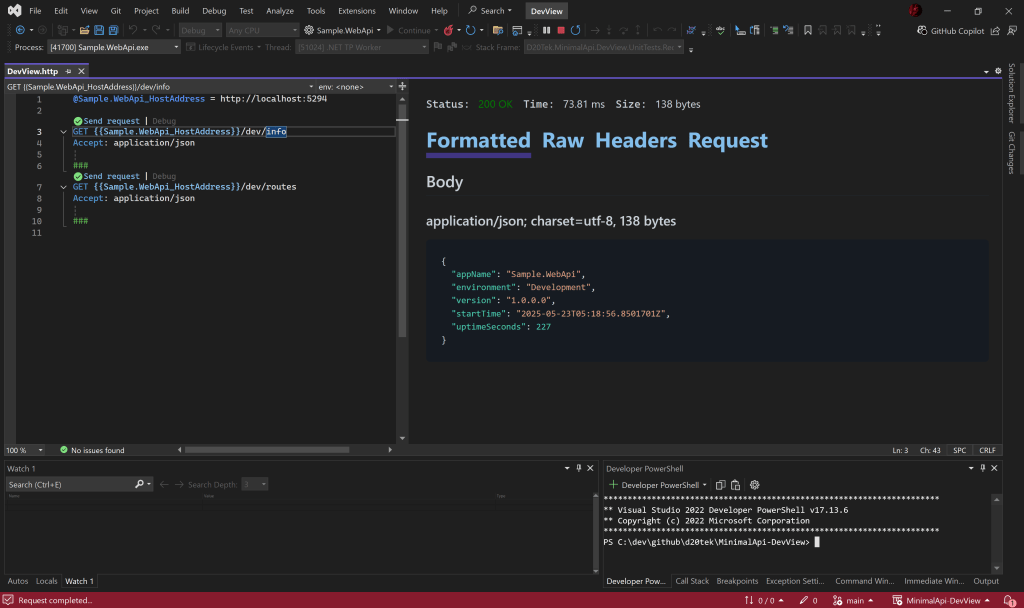
We get the following when we call the endpoint from an .http file:
Route Explorer – /dev/routes
View all registered Minimal API endpoints, including methods, route patterns, and handlers.
[
  {
    "Method": "GET",
    "Pattern": "/users/{id}",
    "Handler": "UsersEndpoints.GetById"
  },
  {
    "Method": "POST",
    "Pattern": "/auth/login",
    "Handler": "AuthEndpoints.Login"
  }
]
And here’s how it looks being called from an .http file request:

Dependencies Explorer – /dev/deps
View all service dependencies registered with the Minimal API dependecy injection container. Help ensure that all of the services and classes that your WebApi requires are there as expected.
[
  {
    "serviceType": "Microsoft.Extensions.Hosting.IHostingEnvironment",
    "implementation": "Microsoft.Extensions.Hosting.Internal.HostingEnvironment",
    "lifetime": "Singleton",
    "assemblyName": "Microsoft.Extensions.Hosting"
  },
  {
    "serviceType": "Microsoft.Extensions.Hosting.IHostEnvironment",
    "implementation": "Microsoft.Extensions.Hosting.Internal.HostingEnvironment",
    "lifetime": "Singleton",
    "assemblyName": "Microsoft.Extensions.Hosting"
  },
  ...
]
Configuration Explorer – /dev/config
View all configuration settings available to your running Minimal API service (with their source provider). This explorer shows the resolved configuration, so you can see what your service will get when it requests that configuration key. It also shows the source for that configuration, so you can debug why that configuration value isn’t what you expected and where it is being overridden.
{
  "summary": {
    "environmentName": "Development",
    "loadedJsonFiles": [
      "appsettings.json",
      "appsettings.Development.json"
    ],
    "providers": [
      {
        "name": "Appsettings (appsettings.Development.json)",
        "providedKeys": 5
      },
      {
        "name": "Appsettings (appsettings.json)",
        "providedKeys": 2
      },
      {
        "name": "ChainedConfigurationProvider",
        "providedKeys": 2
      },
      {
        "name": "Environment Variable",
        "providedKeys": 10
      },
      {
        "name": "In-Memory",
        "providedKeys": 1
      }
    ],
    "effectiveUrls": [
      "https://localhost:7211",
      "http://localhost:5294"
    ]
  },
  "configDetails": [
    {
      "key": "Logging:LogLevel:Default",
      "value": "Information",
      "source": "Appsettings (appsettings.Development.json)",
      "isSensitive": false,
      "valueType": "string"
    },
    {
      "key": "Logging:LogLevel:Microsoft.AspNetCore",
      "value": "Warning",
      "source": "Appsettings (appsettings.Development.json)",
      "isSensitive": false,
      "valueType": "string"
    },
    {
      "key": "AllowedHosts",
      "value": "*",
      "source": "Appsettings (appsettings.json)",
      "isSensitive": false,
      "valueType": "string"
    },
    {
      "key": "ConnectionStrings:DefaultConnection",
      "value": "*****",
      "source": "Appsettings (appsettings.json)",
      "isSensitive": true,
      "valueType": "string"
    },
    ...
  ]
}
Request Logging Middleware
See clean logs for every HTTP request and response, including status codes and duration.
--> GET /weatherforecast
<-- 200 OK (128ms)
Optional configuration lets you include headers, bodies, and set log levels as needed.
Safe by Default
All endpoints and middleware are automatically disabled in production (when IHostEnvironment.IsProduction). You can safely include this package in your project without worrying about leaking internal information.
Getting Started
Install the NuGet package:
dotnet add package MinimalApi.DevView
Enable it in Program.cs:
if (app.Environment.IsDevelopment())
{
    app.UseMinimalApiDevView();
}
That’s it, no further setup required.
You can also UseMinimalApiDevView in other environments, like Test or Staging. But the registration code specifically skips the Production environment.
Customization Options
You can customize the base path, logging behavior, and metadata inclusion using the fluent options API:
app.UseMinimalApiDevView(options =>
{
    options.BasePath = "/_dev";
    options.EnableLogging = true;
    options.IncludeRouteMetadata = true;
});
Or through appsettings.Development.json:
{
  "DevView": {
    "BasePath": "/dev",
    "EnableLogging": true
  }
}
If you want to see the raw list of all metadata for your MinimalApi endpoints, you can set the IncludeRouteDebugDetails to true. Now when you call the /dev/routes, you will see the following details in the MetadataTypes array property.
  {
    "Method": [
      "GET"
    ],
    "Pattern": "/weatherforecast",
    "Tags": [],
    "Handler": "<Create>b__1",
    "Name": "GetWeatherForecast",
    "Produces": [
      "StatusCode: 200, ContentTypes: application/json, Type: Sample.WebApi.Endpoints.Forecasts.ForecastResponse[]"
    ],
    "MetadataTypes": [
      "Type: RuntimeMethodInfo, Value:Sample.WebApi.Endpoints.Forecasts.ForecastResponse[] <<Main>$>b__0_1(Sample.WebApi.Endpoints.Forecasts.GetForecastsHandler)",
      "Type: HttpMethodMetadata, Value:HttpMethods: GET, Cors: False",
      "Type: ParameterBindingMetadata, Value:Microsoft.AspNetCore.Http.Metadata.ParameterBindingMetadata",
      "Type: ProducesResponseTypeMetadata, Value:Produces StatusCode: 200, ContentTypes: application/json, Type: Sample.WebApi.Endpoints.Forecasts.ForecastResponse[]",
      "Type: NullableContextAttribute, Value:System.Runtime.CompilerServices.NullableContextAttribute",
      "Type: ProducesResponseTypeMetadata, Value:Produces StatusCode: 200, ContentTypes: application/json, Type: Sample.WebApi.Endpoints.Forecasts.ForecastResponse[]",
      "Type: EndpointNameMetadata, Value:EndpointName: GetWeatherForecast",
      "Type: RouteNameMetadata, Value:RouteName: GetWeatherForecast",
      "Type: RouteDiagnosticsMetadata, Value:Route: /weatherforecast"
    ]
  }
Designed for Developers
MinimalApi.DevView is built to improve your developer experience:
- Quickly debug route issues
- See app runtime info at a glance
- View clean request/response logs
- Stay out of your way in production
Whether you’re debugging a single service or juggling a suite of microservices, MinimalApi.DevView makes diagnostics easier and safer.
Try It Out Today
MinimalApi.DevView is now available on NuGet.org:
👉 NuGet Package: MinimalApi.DevView
Add it to your project and experience a smoother, faster development process with better visibility into your Minimal APIs.
 DarthPedro's Blog