
There are a few Mediator and Command implementations in the .NET ecosystem. The most popular one has been Mediatr. But with the recent announcement that Mediatr is moving to a commercial license, many developers looking for alternatives. In an attempt to support the .NET community, I am building a simplified Mediator and Command library that will implement the basic mediator, command, and handler pattern, call D20Tek.Mediator.
The initial release supports sync and async ICommand, ICommandHandler, and IMediator for basic commanding. It also supports multi-cast notifications to send INotification objects to all registered INotificationHandlers (with sync and async support). And IMediator also supports Notify methods for clients to use. Finally, D20Tek.Mediator has basic handler discovery and registration helper functions to simplify the dependency injection registration code required for large systems.
In this article, we’re going to show how to add the D20Tek.Mediator package to the default WebApi project, define a command and handler to generate the weather forecast, change the simple WeatherForecast endpoint to use the mediator (rather than having that code directly in the endpoint mapping.
Create the WebApi Project
First, create a WebApi project using the following steps.
Install the D20Tek.Mediator Package
You can either, run the following command in the Package Manager Console (note that the version may be updated):
PM > Install-Package D20Tek.Mediator -Version 0.9.3
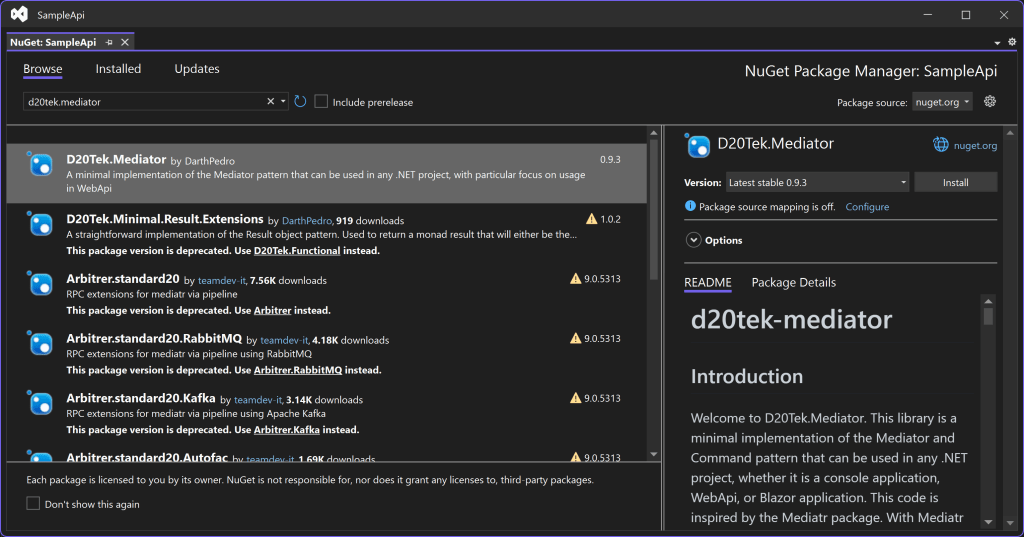
Or to install the package in the Visual Studio UI, go to the Tools menu > “Manage NuGet Packages”. Then, search for D20Tek.Mediator, and install the latest version of the package from there.
Define the Command and Handler
The basic building blocks of the Mediator are the ICommand<TResponse> and ICommandHandler<TCommand, TResponse>. These are used to implement the standard Command pattern. For our sample, we are going to rebuild the WeatherForecast functionality using this pattern. We are starting with this simple case because developers are already familiar with the code and can concentrate on learning the new package requirements.
Note: this sample is using the synchronous approach, but there are corresponding async ICommandHandlerAsync<TCommand, TResponse> and IMediator.SendAsync functions.
1.) Let’s start by moving the WeatherForecast type into a ForecastResponse record in its own file called ForecastResponse.cs.
namespace SampleApi;

public sealed record ForecastResponse(DateOnly Date, int TemperatureC, string? Summary)
{
    public int TemperatureF => 32 + (int)(TemperatureC / 0.5556);
}
2.) Create the GetForecasts class with the following code:
using D20Tek.Mediator;

namespace SampleApi;

public sealed class GetForecasts
{
    public record Command : ICommand<ForecastResponse[]>;

    public class Handler : ICommandHandler<Command, ForecastResponse[]>
    {
        private static readonly string[] _summaries =
        [
            "Freezing", "Bracing", "Chilly", "Cool", "Mild", "Warm", "Balmy", "Hot", "Sweltering", "Scorching"
        ];

        public ForecastResponse[] Handle(Command command)
        {
            var forecast = Enumerable.Range(1, 5).Select(index =>
                new ForecastResponse
                (
                    DateOnly.FromDateTime(DateTime.Now.AddDays(index)),
                    Random.Shared.Next(-20, 55),
                    _summaries[Random.Shared.Next(_summaries.Length)]
                ))
                .ToArray();
            return forecast;
        }
    }
}
I use the GetForecasts class to group the related command and handler, but you can also put them in separate classes and files. The GetForecasts.Command must derive from ICommand<ForecastResponse[]> and is just used for command routing with no properties. But if we had query parameters, they would be added to this command. The GetForecasts.Handler class implements the corresponding ICommandHandler<GetForecasts.Command, ForecastResponse[]> and contains the forecast generation in the Handle method. This code randomly creates weather forecasts for the next 5 days.
Register Mediator and Handler
Now that the command and handler exists, we need to register the IMediator service and the GetForecasts.Handler with the ASP.NET dependency injection container.
// Add services to the container.
builder.Services.AddMediator();
builder.Services.AddScoped<ICommandHandler<GetForecasts.Command, ForecastResponse[]>, GetForecasts.Handler>();
The code above registers the command handler by hand, but we can also use D20Tek.Mediator to automatically find the handlers in our assembly by changing the registration code to the following:
builder.Services.AddMediatorFor<Program>();
This scanning and registration helper makes it easy to add handlers without having to constantly update the DI registration code.
Update MinimalApi Endpoint
Finally, we need to change the MapGet to use the IMediator service to send the command. Replace all of the MapGet code with the following:
app.MapGet("/weatherforecast", ([FromServices] IMediator mediator) =>
     mediator.Send(new GetForecasts.Command()))
   .WithName("GetWeatherForecast");
With all of these changes made, the project is ready to run. Press F5 to run the SampleApi service. Then, send a GET request to the service, and you will see the following results:
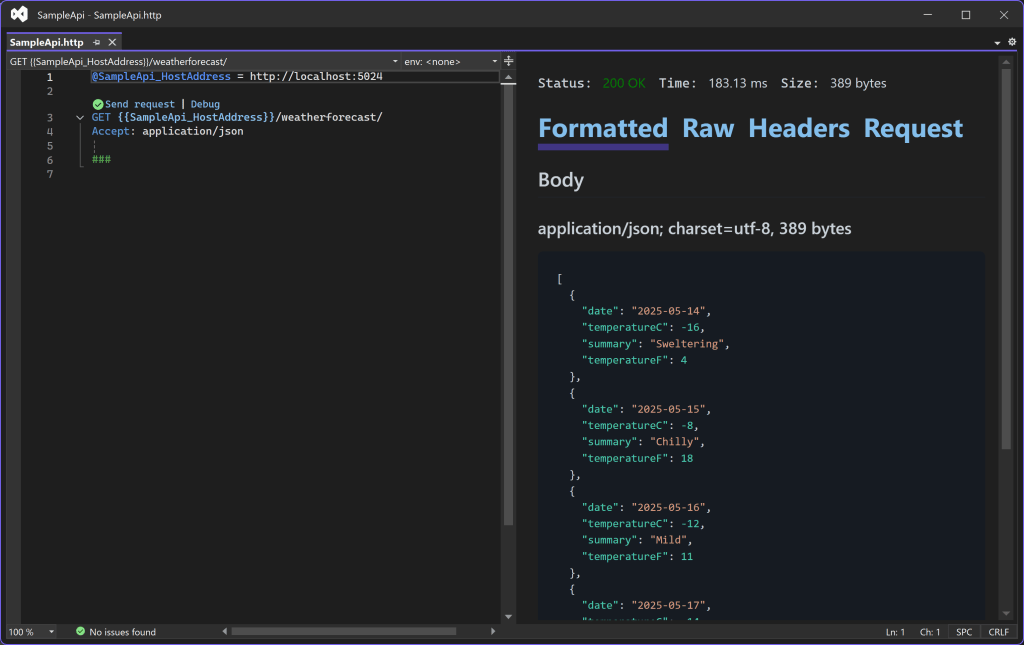
Our service is working as expected and the code has been refactored into the Mediator and Command pattern.
Conclusion
With this basic sample, we learned how to implement the Mediator and Command patterns using the D20Tek.Mediator package. We refactored the WeatherForecast endpoint to use ICommand<ForecastResponse[]> and ICommandHandler<GetForecasts.Command, ForecastResponse[]> to implement the functionality. And then used the IMediator.Send function to forward the command to the registered handler.
Hopefully you found these steps to be easy and straightforward. And see the benefit of structuring your code in a predictable, decoupled way, so that your project can grow with new features.
This is the basis for implementing all of the commands you need in more complex WebApi services. We will have further articles about implementing more complex scenarios.
 DarthPedro's Blog