
In many of our future articles, we will be using ASP.NET MinimalApi project to show how the Mediator library can be used. So in this article, we will discuss how to create WebApi projects in Visual Studio.
Create the WebApi Project
If you don’t already have a WebApi project, please create a new one called SampleApi either through the .NET CLI or in Visual Studio. When you launch Visual Studio to the start page, click the Create New Project button.
Select the WebApi project template:

Name the project to what you would like (SampleApi in this case). Then press the Next button.

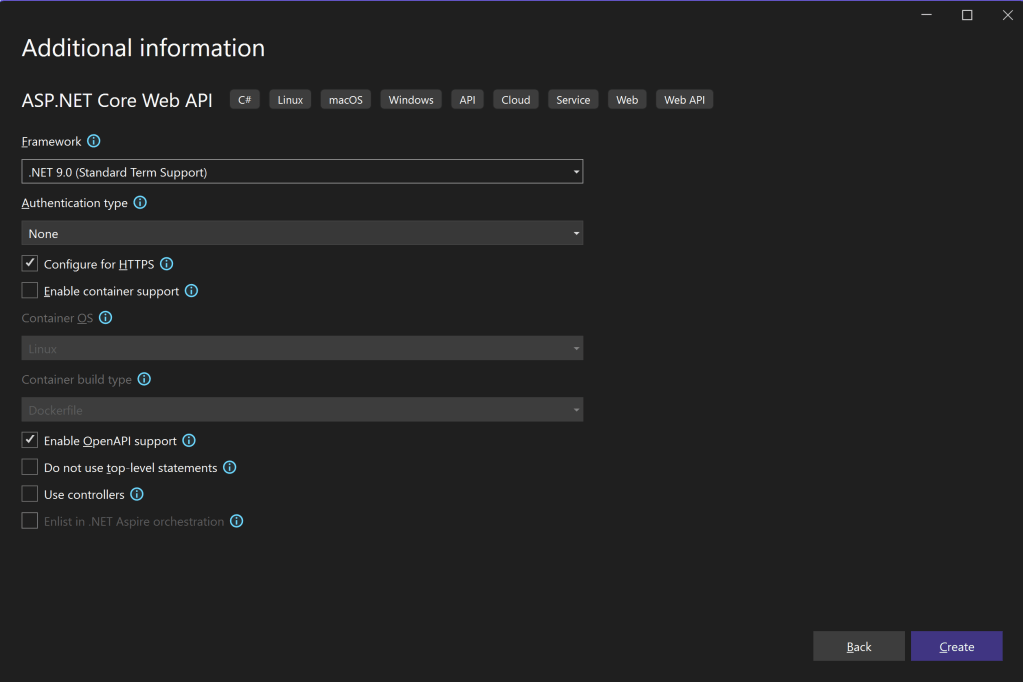
In the project information dialog: enable OpenApi support, enable top-level statements, and do not use Controllers. We will be using a MinimalApi endpoint in this sample. However, D20Tek.Mediator supports both types of projects, and we will have other posts that use Controllers.
This will create the basic WebApi project with the following Program.cs file and solution files:

If you build and run the project, you will see the familiar WeatherForecast service.
Now, we are ready to start making changes..
 DarthPedro's Blog
One thought on “Setting up WebApi Sample Project”